
Podcatcher Deluxe2016.06 - Google Play
You'll be able to see results in few seconds.
Publisher Description
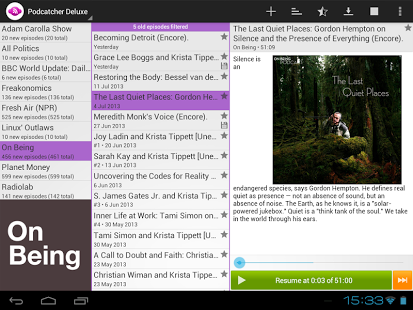
Podcatcher Deluxe is a
full-featured audio podcast app
designed to manage your podcast content easily while on the go.
Along with basic playback functionality, Podcatcher Deluxe features a
sophisticated three column layout
. One contains the list of podcast subscriptions, another displays episodes currently available (for the selected subscription) and the third column clearly displays detailed podcast episode descriptions. This
layout works especially well on tablets
and big-screen phones. Multiple feeds are supported with this elegant design and can conveniently be searched while playing. The
integrated podcast finder
gets you going quickly.
In addition, this premium version allows
downloading of episodes
, resumes to the last play position on restart and adds support for episode filters (new/old episodes). It also provides a
playlist
option for uninterrupted back-to-back playback.
Visit http://www.podcatcher-deluxe.com for more information.
Highlights
→ Adaptive layout, works great on both phones and tablets
→ Resume playback
→ Integrated podcast catalog
→ OPML file import and export
→ Works with Android Wear and Android Auto
→ Support for Bluetooth audio devices
→ Custom download folder
→ Playlists and filters
→ Optional auto-downloads and auto-deletes
→ Synchronization via Dropbox and gpodder.net
→ No ads, no tracking
About Podcatcher Deluxe
The company that develops Podcatcher Deluxe is Kevin Hausmann. The latest version released by its developer is 2016.06.
To install Podcatcher Deluxe on your Android device, just click the green Continue To App button above to start the installation process. The app is listed on our website since 2016-06-03 and was downloaded 0 times. We have already checked if the download link is safe, however for your own protection we recommend that you scan the downloaded app with your antivirus. Your antivirus may detect the Podcatcher Deluxe as malware as malware if the download link to com.podcatcher.deluxe is broken.
How to install Podcatcher Deluxe on your Android device:
- Click on the Continue To App button on our website. This will redirect you to Google Play.
- Once the Podcatcher Deluxe is shown in the Google Play listing of your Android device, you can start its download and installation. Tap on the Install button located below the search bar and to the right of the app icon.
- A pop-up window with the permissions required by Podcatcher Deluxe will be shown. Click on Accept to continue the process.
- Podcatcher Deluxe will be downloaded onto your device, displaying a progress. Once the download completes, the installation will start and you'll get a notification after the installation is finished.
Program Details
System requirements
Download information
Pricing
Version History
version 2016.06
posted on 2016-06-03
- Faster podcast suggestion loading,- Library updates and small bug fixes
version 3.6
posted on 2013-07-03
Several fixes and updates
Disclaimer
Official Google Play Link
We do not host Podcatcher Deluxe on our servers. We did not scan it for viruses, adware, spyware or other type of malware. This app is hosted by Google and passed their terms and conditions to be listed there. We recommend caution when installing it.
The Google Play link for Podcatcher Deluxe is provided to you by apps112.com without any warranties, representations or guarantees of any kind, so access it at your own risk.
If you have questions regarding this particular app contact the publisher directly. For questions about the functionalities of apps112.com contact us.
